


Finding an ergonomic office chair that properly supports your back for eight-plus hours a day without costing $1,500 takes some research. The sub-$400 segment has improved over the past two years, but most chairs in this range still cut corners on lumbar adjustability, build quality, or warranty coverage. We compared ergonomic chairs across this price range based on specs, expert reviews, and owner feedback. One chair we can speak to from daily use: the UPLIFT Clarksville, which UPLIFT Desk sent as part of a full workstation setup. The other three picks are based on specification analysis and review consensus. This guide separates the one chair we've used daily from researched picks, so you can see exactly where each recommendation comes from.
Check today's price on the UPLIFT Clarksville, the hands-on pick under $400. The matching review is the UPLIFT Clarksville Ergonomic Chair review.
Our pick: The UPLIFT Clarksville Ergonomic Chair ($359) is our top pick after one week of daily workday use. Its flexible lumbar frame has four height positions, the 2:1 synchro-tilt kept Matt's feet grounded while reclining, and UPLIFT publishes a 15-year warranty.
Best adjustability: The Branch Ergonomic Chair (unavailable) offers the widest adjustability with 7 distinct adjustment points.
Best full-mesh adaptive pick: The Sihoo Doro C300 ($279.99−50%) combines Sihoo's self-adaptive lumbar design with a full-mesh seat and back, 4D coordinated armrests, and an adjustable headrest.
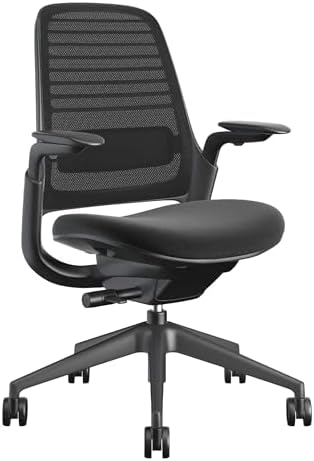
Best stretch warranty pick: The Steelcase Series 1 ($499) costs more than the target budget in most configurations, but its weight-activated controls and 12-year warranty make it the upgrade to consider before leaving this tier.
How We Chose
We prioritized chairs that solve the problems that usually make budget office chairs fail: poor lumbar contact, shallow warranty coverage, limited seat-depth adjustment, weak recline controls, and vague durability claims. The UPLIFT Clarksville is marked as a hands-on pick because it has been part of our daily workstation setup, detailed in our full UPLIFT Clarksville review. The Branch, Sihoo, and Steelcase picks are researched recommendations based on manufacturer specs, published warranty terms, independent editorial coverage, and repeated owner-feedback patterns.
| Pick | Evidence Level | Why It Made the List |
|---|---|---|
| UPLIFT Clarksville | Hands-on daily use | Four lumbar height positions, 2:1 synchro-tilt, 15-year warranty |
| Branch Ergonomic Chair | Researched | Broad adjustment range, Greenguard Gold, BIFMA rating |
| Sihoo Doro C300 | Researched | Self-adaptive lumbar, full mesh, 4D coordinated armrests |
| Steelcase Series 1 | Researched stretch pick | 12-year warranty, weight-activated controls, 400 lb capacity |
Quick Comparison
| Feature | UPLIFT Clarksville | Branch Ergonomic | Sihoo Doro C300 | Steelcase Series 1 |
|---|---|---|---|---|
| Price | $359 | unavailable | $279.99−50% | $499 |
| Lumbar | Adaptive frame, four height positions | Adjustable height + depth | Self-adaptive | Adjustable flexor |
| Seat Depth | Adjustable | 3" adjustable range | 17.13" to 18.11" published; control unclear | 3" adjustable range |
| Recline | 2:1 synchro-tilt | Standard tilt | Weight-sensing, up to 130° | Weight-activated |
| Warranty | 15 years | 7 years | 3 years | 12 years |
| Weight Capacity | 300 lbs | 275 lbs | 330 lbs | 400 lbs |
| Seat | 3" molded foam | Mesh | Full mesh | Foam |
| Best For | Adaptive lumbar + warranty | Maximum adjustability | Full mesh + adjustable headrest | Stretch warranty pick |
Which Chair Should You Buy?
| If You Want... | Start Here | Why |
|---|---|---|
| The strongest strict-budget default pick | UPLIFT Clarksville | Best warranty-to-price ratio, hands-on use, supportive foam seat |
| The most adjustment control | Branch Ergonomic Chair | Seat depth, lumbar height, lumbar depth, and armrest positioning |
| A full-mesh seat and back | Sihoo Doro C300 | Full mesh, self-adaptive lumbar, 4D coordinated arms, and an adjustable headrest |
| A long-term stretch option | Steelcase Series 1 | Costs above the target budget, but adds 12-year coverage and 400 lb capacity |
If the Steelcase is the chair that interests you most, compare it against the broader best ergonomic chairs under $600 before buying. That higher-budget guide includes more fit-specific and long-hour options that don't belong on a strict under-$400 shortlist.
Our Top Picks
UPLIFT Clarksville Ergonomic Chair: Our Pick
Evidence level: Hands-on daily use.
The UPLIFT Clarksville Ergonomic Chair arrived as a surprise addition to our UPLIFT V3 Standing Desk setup. We didn't request it, but after sitting in it daily since setting up our workstation, it leads this guide. At $359, it directly competes with the Branch Ergonomic Chair on price while offering a longer warranty and a lumbar system that works differently from anything else in this range.
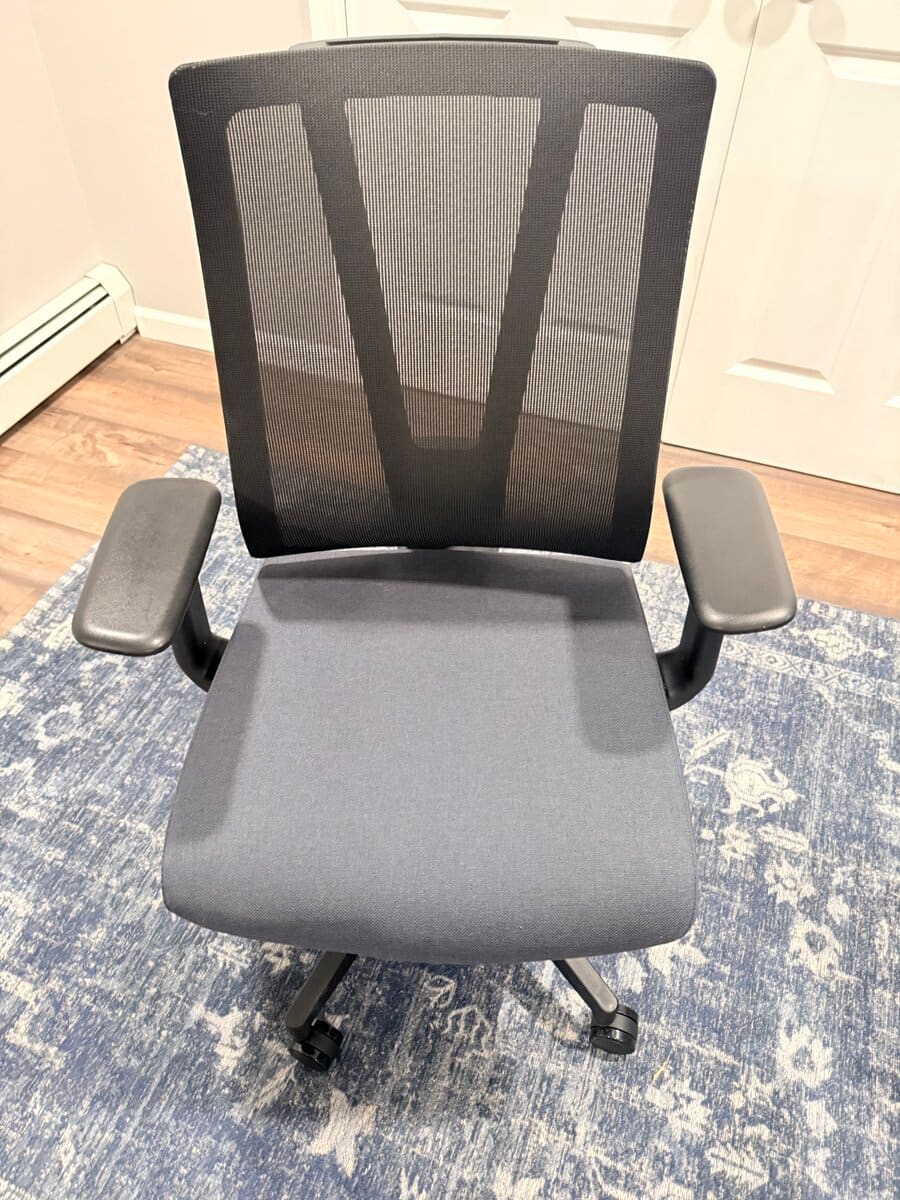
The lumbar support is what sets this chair apart. Instead of a bulky pad, the UPLIFT Clarksville uses a low-profile lumbar frame that flexes with the backrest. UPLIFT documents four lumbar height positions, so you can align the support with your lower back rather than relying on an unspecified set of adjustment points. The hands-on observations in this guide apply to the exact chair Matt used.
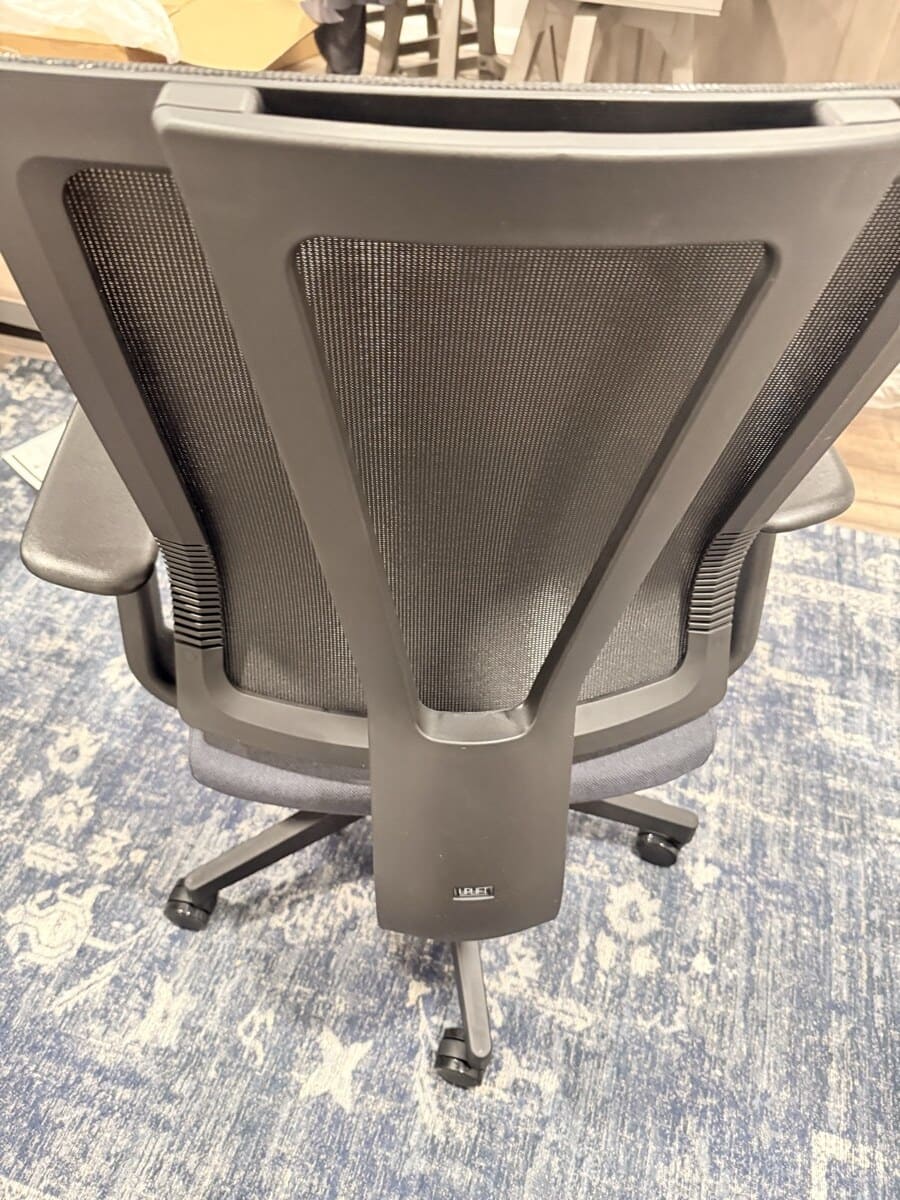
The 2:1 synchro-tilt mechanism is the other standout feature. The back reclines 2 degrees for every 1 degree the seat tilts, which lets you recline deeply while keeping your feet flat on the floor. A three-setting tension dial lets you choose between fluid rocking (low resistance), moderate support, or firm hold. This opens the hip angle and supports upper-body weight in a way that standard recline mechanisms can't match.
The seat cushion is 3 inches of high-density molded foam, upholstered in breathable fabric. It retains its shape and doesn't bottom out, even after extended sitting. The mesh backrest provides solid airflow without the flimsy feel some budget mesh chairs have.
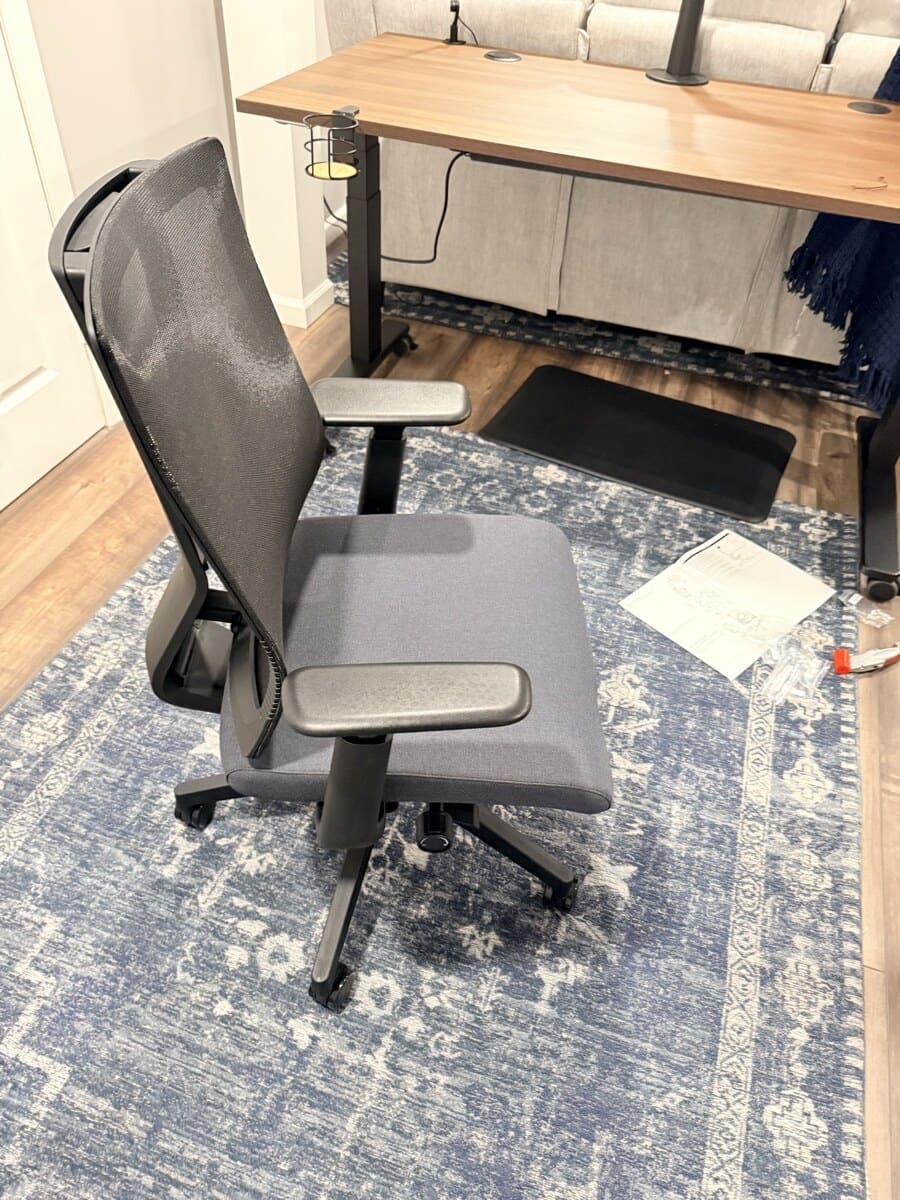
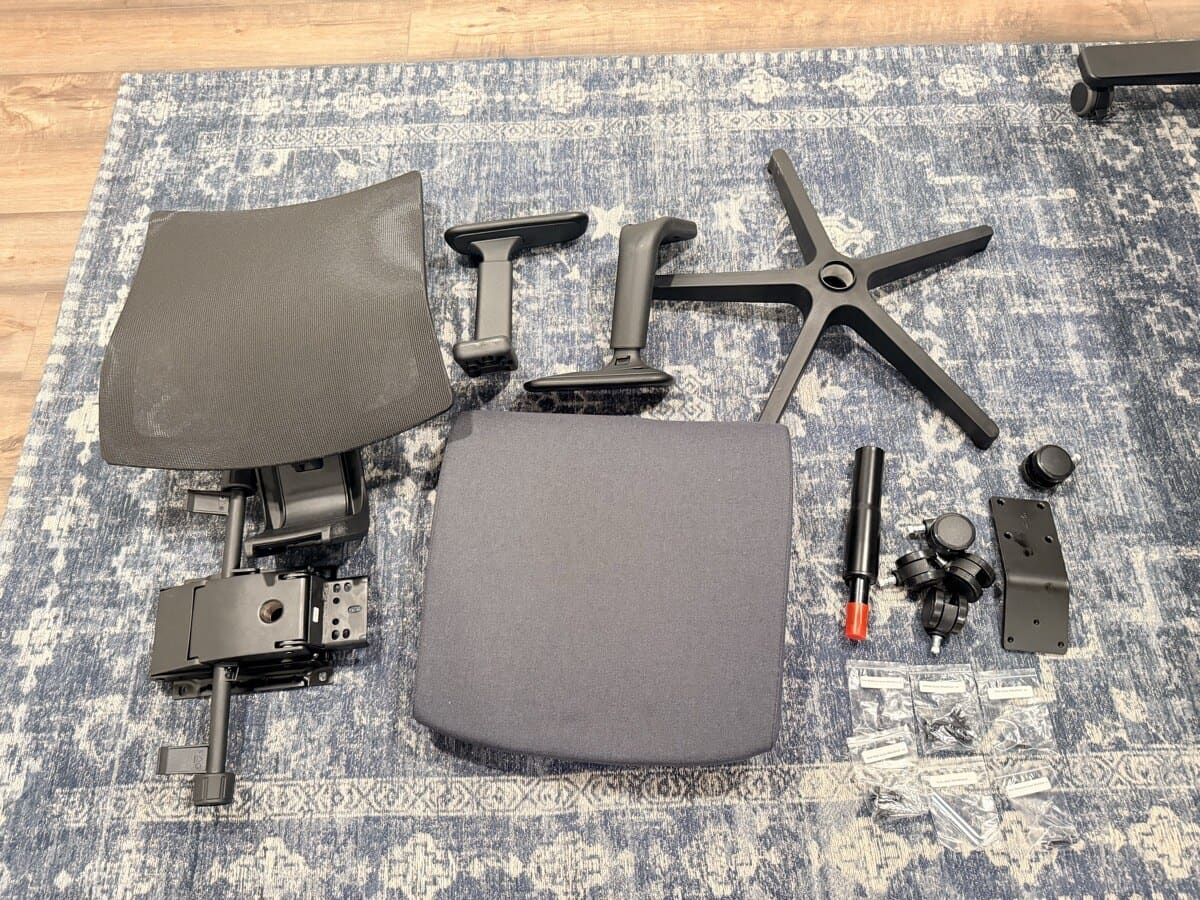
Assembly was straightforward. Everything came packed securely, and the parts layout made it clear which pieces went where.
Price: $359
Lumbar Support: Adaptive low-profile frame with four height positions
Seat: 3" thick high-density molded foam with breathable, wear-resistant fabric
Armrests: Three-way adjustable (height, depth, pivot)
Recline: 2:1 synchro-tilt with three-setting tension dial
Backrest: Firm, breathable mesh with full ventilation
Weight Capacity: 300 lbs
Certifications: ANSI/BIFMA X5.1-2017 tested
Warranty: UPLIFT Desk 15-year warranty with US-based customer service
The UPLIFT Desk 15-year warranty is the longest at this price point by a wide margin. Branch offers 7 years, Sihoo offers 3. Only the Steelcase Series 1 comes close at 12 years, and that chair usually costs notably more. UPLIFT Desk's US-based support team backs every claim, which adds confidence to a chair you'll be sitting in for years.
Where the UPLIFT Clarksville could improve: it doesn't have a headrest option, which matters if you recline frequently for reading or video calls. The three-way armrest adjustment is solid but not as extensive as the Branch's setup. And it's only available through UPLIFT Desk directly, so you can't comparison-shop across retailers.
For the full one-week use notes, see the UPLIFT Clarksville Ergonomic Chair review.
Buying Tips
- The lumbar frame has four height positions. Start near the middle and move it only if the support lands above or below your lower back
- The three-setting tension dial is under the seat on the right side. Start at medium resistance for the first few days
- The foam cushion has a break-in period of about a week. It softens slightly from the initial firmness but retains its shape long-term
- UPLIFT Desk runs sales periodically on chairs. Check their Clarksville page for current pricing
- Pair it with an UPLIFT V3 Standing Desk for a complete ergonomic workstation with matching UPLIFT Desk warranty coverage
Branch Ergonomic Chair: Best Adjustability
Evidence level: Researched recommendation.
The Branch Ergonomic Chair stands out because it delivers the widest range of adjustability in this price bracket. At unavailable depending on color and retailer, it provides seven distinct adjustment points that let you dial in a precise fit for your body type. That level of customization typically starts at a higher price from competitors like Herman Miller or Steelcase's upper lines.
The chair's certifications are the stronger signal than any single roundup placement. Greenguard Gold means it meets strict chemical emissions standards for indoor air quality, and BIFMA commercial-grade rating means the frame, casters, and gas lift are tested to the same durability standards used in corporate offices. Those certifications matter because they indicate engineering rigor that outlasts the initial purchase.
Price: unavailable
Lumbar Support: Adjustable height and depth. You can position the lumbar pad vertically along your spine and control how far it pushes into your lower back, accommodating users from 5'2" to 6'4"
Seat Depth: 3-inch adjustable range, allowing proper thigh support whether your inseam is 28 or 34 inches
Armrests: 3D adjustable (height, depth, and pivot angle). Wide enough range that most users can align their forearms with their desk surface without shoulder tension
Backrest: Breathable mesh with adjustable recline tension. The mesh is firm enough to maintain its shape after months of daily use but responsive enough to flex with your movements
Weight Capacity: 275 lbs on an aluminum base with smooth-rolling casters rated for both carpet and hardwood
Certifications: Greenguard Gold, BIFMA commercial-grade
Warranty: 7 years (frame and mechanism)
The seven adjustment points are seat height, seat depth, lumbar height, lumbar depth, armrest height, armrest depth, armrest pivot, and backrest recline tension. For context, most chairs under $300 offer three adjustments at best: seat height, basic tilt, and maybe armrest height. The Branch closes the gap between budget and premium by giving you most of what a $1,200 chair offers in terms of adjustability.
Where the Branch falls short: its published 275 lb capacity is below the Clarksville's 300 lb and the C300's current 330 lb ratings. The Branch's 7-year warranty, while better than most competitors at this price, cannot match the UPLIFT Clarksville's 15-year or the Steelcase Series 1's 12-year coverage.
Buying Tips
- The mesh seat needs about 5-7 business days to break in fully. If it feels overly firm on day one, give it a full workweek before making a comfort judgment
- Set the lumbar depth to its middle position first, then increase by one notch per day until you find where your lower back feels supported without pressure. Starting at maximum depth causes fatigue for lighter users
- The armrests pivot inward up to 30 degrees, which is useful for narrowing the gap between armrests when typing. Angle them inward about 15 degrees for a natural forearm-to-keyboard alignment
- The aluminum base is noticeably more stable on hard floors than the plastic bases found on most chairs under $400. If you use a chair mat, make sure the casters are set to hard-floor mode
Sihoo Doro C300: Best Full-Mesh Adaptive Pick
Evidence level: Researched recommendation.
The Sihoo Doro C300 is the full-mesh, research-backed pick in this comparison. Sihoo describes its lumbar system as self-adaptive and designed to respond as posture changes. WorkstationSetup has not tested the C300 hands-on, so that manufacturer description should not be read as our own comfort or contact-pressure finding.
The current manufacturer-documented package includes a full-mesh seat and back, 4D coordinated armrests, an adjustable headrest, a 330 lb maximum user weight, and a 3-year warranty. If you are deciding between the hands-on Clarksville and this research-backed C300, see UPLIFT Clarksville vs Sihoo C300.
Price: $279.99−50%
Lumbar Support: Self-adaptive design, per Sihoo
Seat: Full mesh
Seat Depth: 17.13" to 18.11" published range. Current C300 documentation does not clearly identify a sliding control
Armrests: 4D coordinated armrests
Headrest: Adjustable
Weight Capacity: 330 lbs
Warranty: 3 years
The full-mesh construction gives air a clearer path through the seat and back than a foam cushion, but it does not prove that the chair will feel comfortable for a particular person. Mesh tension, seat dimensions, and lumbar shape remain fit questions, and this guide does not have hands-on C300 evidence to settle them.
Compared to the Branch, the C300 trades adjustability breadth for lumbar innovation. The Branch gives you more manual control points. The C300 gives you a lumbar system that adjusts itself. Which matters more depends on whether you tend to sit in one optimized position (Branch advantage) or shift positions frequently throughout the day (C300 advantage).
The main tradeoff is the 3-year warranty, which is the shortest of the four chairs in this guide. That coverage is a verified term, not a prediction that the chair will fail at three years or remain trouble-free through the full period.
Buying Tips
- Position the adjustable headrest so it supports your head without pushing it forward while you sit upright
- Current C300 documentation does not list a sliding seat-depth control. Compare the published seat dimensions with your thigh length before ordering
- Confirm that your retailer and country are eligible for Sihoo's 3-year warranty before buying
- Sihoo lists a 330 lb maximum user weight. Treat that as a limit, not a fit guarantee
- Pair the C300 with a standing desk if you want to alternate positions, but do not treat the chair's self-adaptive label as a hands-on comfort result
Steelcase Series 1: Best Stretch Warranty Pick
Evidence level: Researched stretch pick.
The Steelcase Series 1 sits above the target budget, and we're including it as a stretch pick because the value math changes when you factor in the warranty. Steelcase backs the Series 1 with a 12-year warranty, the same coverage applied to their premium Leap and Gesture chairs. Over a 12-year span, the per-year cost is often lower than replacing a cheaper chair every 3-4 years.
The Series 1 also appears consistently in major office-chair coverage because the Steelcase engineering and warranty support bring legitimate long-term value despite the higher upfront price.
Price: $499 (depending on configuration; usually above this guide's strict budget)
Lumbar Support: Adjustable flexor system with height and depth control
Seat Controls: Weight-activated mechanism. The chair automatically adjusts recline tension based on how much you weigh, reducing the trial-and-error of manual tension dials
Seat Depth: Adjustable (3-inch range)
Armrests: 4D adjustable (height, width, depth, and pivot). Comparable to the Branch and C300 in range of adjustment
Weight Capacity: 400 lbs (the highest in this comparison by a wide margin)
Build: Steelcase commercial-grade construction with replaceable components
Warranty: 12 years (Steelcase standard warranty covering all components)
The weight-activated seat and back controls are the feature that distinguishes the Series 1 from manual-adjustment competitors. Instead of dialing in recline tension yourself, the chair senses your weight and calibrates resistance automatically. A 140 lb user and a 250 lb user both get appropriate recline tension without touching a dial. This is a real advantage in multi-user environments: shared home offices, hot-desking setups, or households where multiple family members use the same workspace.
The 400 lb weight capacity is the highest published figure in this comparison, above the C300's 330 lb, Clarksville's 300 lb, and Branch's 275 lb ratings. A capacity rating is a user limit, not proof that one chair will last longer than another.
The trade-off at this price is primarily the upholstery and customization. The base configuration covers the essentials, but upgrading the backrest material or adding a headrest pushes the price into the higher-budget tier. The Series 1 compensates with its weight-activated mechanism and the confidence of knowing Steelcase will repair or replace components for over a decade.
Buying Tips
- The weight-activated mechanism needs no adjustment for most users, but if you weigh under 130 lbs, the recline may feel slightly too loose. Steelcase offers an optional light-spring kit for smaller users
- The Series 1 is available in a wide range of upholstery colors and frame finishes through Steelcase's configurator. Ordering direct lets you customize, while retail versions come in standard configurations
- Consider the Series 1 if you plan to keep your chair for 7+ years. The 12-year warranty and replaceable-component design mean you can swap out worn seat cushions or armrest pads without replacing the entire chair
- The 400 lb capacity makes this the safest pick if you're close to the weight limits of the other chairs or if the chair will be shared among multiple users of varying sizes
How These Four Chairs Compare
Choosing between these chairs comes down to which priority matters most to you: hands-on lumbar evidence, adjustability range, a self-adaptive lumbar design, or long-term warranty protection.
The UPLIFT Clarksville is the pick if you want a flexible lumbar frame, a thick foam seat, and long published coverage ($359 with UPLIFT Desk 15-year coverage). Matt used it for one week of daily workdays, and its 2:1 synchro-tilt felt noticeably different from a basic single-pivot recline during that period.
The Branch Ergonomic Chair is the pick for users who want maximum control over their seating position. Its seven adjustment points let you fine-tune fit to a degree that normally requires a much more expensive chair.
The Sihoo Doro C300 is the research-backed pick if you want full mesh, a self-adaptive lumbar design, 4D coordinated armrests, and an adjustable headrest. WorkstationSetup has not tested how its lumbar feels across a full workday.
The Steelcase Series 1 is the stretch pick for users who prioritize longevity and hassle-free setup. The weight-activated controls reduce setup complexity, and the 400 lb capacity provides the most structural margin.
| Feature | UPLIFT Clarksville | Branch Ergonomic | Sihoo Doro C300 | Steelcase Series 1 |
|---|---|---|---|---|
| Price | $359 | unavailable | $279.99−50% | $499 |
| Lumbar | Adaptive frame, four height positions | Adjustable height + depth | Self-adaptive | Adjustable flexor |
| Armrests | 3-way adjustable | 3D adjustable | 4D coordinated | 4D adjustable |
| Seat Depth | Adjustable | 3" adjustable range | 17.13" to 18.11" published; control unclear | 3" adjustable range |
| Seat | 3" molded foam | Mesh | Full mesh | Foam |
| Recline | 2:1 synchro-tilt | Standard tilt | Weight-sensing, up to 130° | Weight-activated |
| Warranty | 15 years | 7 years | 3 years | 12 years |
| Weight Capacity | 300 lbs | 275 lbs | 330 lbs | 400 lbs |
| Certifications | ANSI/BIFMA | Greenguard Gold, BIFMA | Sihoo says BIFMA and TUV tested | BIFMA |
| Best For | Adaptive lumbar + warranty | Maximum adjustability | Full mesh + adjustable headrest | Stretch warranty pick |
Already shopping within the UPLIFT lineup? The UPLIFT ergonomic chair comparison puts the Bolan, Clarksville, and Intuition side by side by fit, seat material, lumbar design, recline, and price.
Frequently Asked Questions
Do ergonomic chairs under $400 actually help with back pain?
Yes, when the chair fits and is adjusted appropriately. The four designs work differently: the UPLIFT Clarksville uses an adaptive frame with four height positions, the Branch uses manual height and depth positioning, Sihoo describes the C300 as self-adaptive, and the Series 1 uses an adjustable flexor system. A product label cannot guarantee pain relief, so persistent back pain should be discussed with a qualified health professional.
How long should an ergonomic chair under $400 last?
There is no defensible universal lifespan for a chair in this price range. Usage, user weight, adjustment habits, replaceable parts, and warranty coverage all matter. The verified coverage periods here are 3 years for the C300, 7 years for Branch, 12 years for the Series 1, and 15 years for the Clarksville. A warranty is not proof that a chair will last exactly that long.
Is the Steelcase Series 1 worth the extra cost over the other three?
It depends on your priorities. The Series 1 pairs a 12-year warranty with replaceable components, weight-activated controls, and a 400 lb capacity. The C300 costs $279.99−50% and offers the full-mesh, self-adaptive package with 3-year coverage. The Clarksville costs $359, carries a 15-year warranty, and has a 300 lb capacity.
What's the difference between the Sihoo C300's self-adaptive lumbar and a regular adjustable lumbar?
A standard adjustable lumbar pad stays at the height and depth you set manually. Sihoo describes the C300's lumbar as self-adaptive, meaning the support is designed to respond as posture changes rather than remaining at one manual setting. WorkstationSetup has not tested that behavior hands-on. The UPLIFT Clarksville uses a different adaptive frame with four user-selectable height positions.
Can I use these chairs on hardwood floors without a mat?
All four chairs come with casters, but their floor compatibility varies. The Branch includes dual-wheel casters designed for both carpet and hard floors. The UPLIFT Clarksville, C300, and Series 1 ship with standard casters that work on carpet but can scratch hardwood over time. For hardwood or tile floors, replace stock casters with rollerblade-style polyurethane wheels ($25-$40 for a set of five) or use a chair mat. A good desk mat can also extend under the chair to protect your floor.
How do I know which chair fits my body size?
Start with weight capacity as a safety limit, then compare seat height, seat depth, and width with your body. The Branch publishes a 3-inch seat-depth range. Current C300 documentation does not list a sliding seat-depth control, so compare its published seat dimensions carefully instead of assuming it adjusts like the Branch. The Clarksville has a 300 lb capacity, an adjustable seat-depth range, and four lumbar height positions.
Should I buy an ergonomic chair or a standing desk first?
If you can only invest in one upgrade, buy the chair first. You spend more total hours sitting than standing (even standing desk users typically sit the majority of their workday), and a bad chair causes more immediate discomfort than a bad desk. Once you have proper seating, adding a standing desk lets you alternate positions throughout the day, which may be better for spinal health than either sitting or standing exclusively.
Are gaming chairs as ergonomic as these office chairs?
Generally, no. Gaming chairs prioritize aesthetics (racing-style bolsters, aggressive color schemes) over ergonomic adjustability. Most gaming chairs under $400 offer basic height adjustment and a fixed recline, but lack adjustable lumbar depth, seat depth control, or synchro-tilt mechanisms like the UPLIFT Clarksville's. At equal price points, purpose-built ergonomic office chairs consistently provide better spinal support for extended sitting.
Disclosure
The UPLIFT Clarksville review is based on daily hands-on use. UPLIFT Desk provided the chair at no cost for review purposes. All other recommendations are based on specification analysis, expert reviews, and owner feedback.
Related Guides
- Best Standing Desks Under $700: Pair your ergonomic chair with a height-adjustable desk
- Best Monitor Arms for Desk Space: Position your screen at eye level to complement proper chair posture
- Best Desk Mats for Home Office: Protect your floor from caster wear
- Best Laptop Stands for Ergonomic Setup: Raise your laptop screen to reduce neck strain while seated
- Best Ergonomic Desk Setup: Complete Guide: Full walkthrough of building a workspace
- UPLIFT V3 Standing Desk Unboxing: See the Clarksville chair alongside the full UPLIFT Desk setup
- Complete Home Office Setup Under $1,000: UPLIFT Clarksville included in the premium build
- Best Ergonomic Chairs Under $600: Long-hour, fit-specific, and higher-budget chair picks
- Which Steelcase Chair Should You Buy?: Where the Series 1 stretch pick sits in the full Steelcase line
- UPLIFT Clarksville Ergonomic Chair Review: One week of daily use notes
- UPLIFT Clarksville vs Sihoo C300: Hands-on Clarksville vs the research-backed C300