

A good monitor arm fixes the two biggest problems with a stock display stand: it lifts your screen to eye level and clears the desk space the base was eating. The catch is that the arms everyone recommends, like the Ergotron LX, often sit near the top of the under-$200 range. If your goal is a cleaner desk on a tighter budget, the better move is usually a dual-monitor arm or a laptop-plus-monitor mount that creates more visible workspace per dollar.
Bottom line
Best monitor arm under $150: The ErGear Dual Monitor Stand ($25-$35) floats two screens off the desk for about the price of one cheap riser.
Best full-motion dual arm: The Mount-It! Dual Monitor Mount ($70-$85) gives each screen its own spring arm and VESA 75/100 support.
Best laptop plus monitor arm: The HUANUO Laptop and Monitor Mount ($25-$38) mounts a display and your laptop from one clamp.
Quick Comparison
| Arm | Price | Best For | Screens | Capacity | Mount |
|---|---|---|---|---|---|
| ErGear Dual Monitor Stand | $25-$35 | Overall value | 2 (up to 32") | 17.6 lbs/arm | Clamp + grommet |
| Mount-It! Dual Monitor Mount | $70-$85 | Full-motion dual | 2 (17-32") | 19.8 lbs/arm | Clamp + grommet |
| HUANUO Laptop and Monitor Mount | $25-$38 | Laptop + monitor | 1 + laptop | 22 lbs total | Clamp |
ErGear Dual Monitor Stand: Best Overall Value
If you run two monitors, this is the cheapest way to get both of them off the desk and onto adjustable arms. The ErGear holds a screen up to 32 inches on each arm, up to 17.6 lbs apiece, and gives you full tilt, swivel, rotation, and height on both. You get clamp and grommet hardware in the box, so it works on almost any desk.
It's a steel build, so it's heavier and a little less polished than a premium arm, and the gas-spring tension wants an occasional Allen-key adjustment to match your monitor weight. For around $30, those are easy trade-offs. Amazon buyer ratings average 4.4 stars or better.
Price: $25-$35
Mount-It! Dual Monitor Mount: Best Full-Motion Dual
Spend a bit more than the ErGear and the Mount-It! gives you noticeably smoother spring arms. Each screen rides its own full-motion arm, so you can angle one toward you and turn the other to portrait for code or documents. It fits 17 to 32 inch monitors up to 19.8 lbs each, supports both VESA 75x75 and 100x100, and installs with a clamp or a grommet.
It costs more than a basic fixed stand, and very light monitors can need a little spring-tension tuning. But for a dual setup you reposition often, the independent arms are worth it. Amazon buyer ratings land around 4.6 stars.
Price: $70-$85
HUANUO Laptop and Monitor Mount: Best Laptop + Monitor Combo
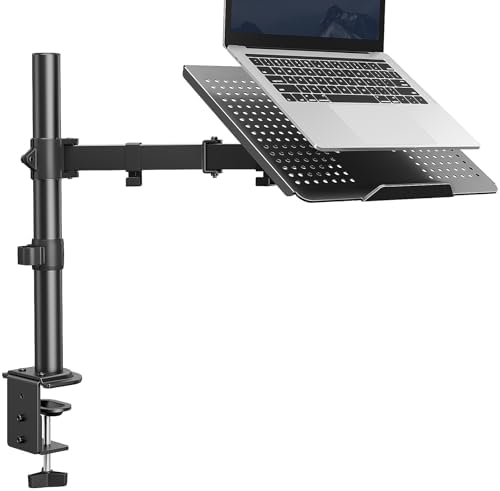
If you dock a laptop next to an external display, this one solves a layout most arms ignore. It mounts a monitor on the arm and your laptop on a ventilated tray, both from a single desk clamp, holding up to 22 lbs combined. The monitor arm has full tilt, swivel, and rotation, and the laptop tray keeps air moving underneath so the machine doesn't cook.
The single-pole design is less flexible than two separate arms, and the tray is snug with the largest 17 inch laptops. For freeing up the entire desktop in a laptop-plus-monitor setup, it's hard to beat at under $30. Amazon buyer ratings sit around 4.5 stars.
Price: $25-$38
How to Choose a Budget Monitor Arm
A cheap arm can be a great arm if you match it to your gear. Four things matter most:
- Weight capacity. Check your monitor's weight (without the stand) and stay comfortably under the arm's per-arm rating. An arm running near its limit is the one that sags.
- Gas spring vs fixed. Gas-spring arms let you reposition with one hand and hold the new position. Fixed or friction designs are cheaper but fight you every time you adjust. All three picks here use spring movement.
- VESA pattern. Most monitors use VESA 75x75 or 100x100mm. Confirm yours has the four threaded holes on the back. If it has none, you'll need a VESA adapter bracket.
- Clamp vs grommet. A C-clamp grips the back edge of the desk and is the easiest install. A grommet mount drops a bolt through a hole in the desk for a cleaner look. Two of these picks include both.
Buying Tips
Measure your desk's edge thickness before you order. Most clamps fit desks up to about 3.3 inches thick, and a very thick or very thin top can be a problem. If your desk has a back lip or a rounded edge, a grommet mount is the safer choice.
Frequently Asked Questions
Are cheap monitor arms any good?
Yes, within reason. A sub-$80 arm with a gas spring and a sensible weight rating will hold a standard monitor at eye level for years. The gap between budget and premium shows up in joint smoothness, long-term tension hold, and warranty length, not in whether the arm does its basic job. Match the arm to your monitor's weight and you'll be fine.
What's the best monitor arm under $200?
Under $200 you can step up to a premium single arm like the Ergotron LX, or choose a stronger value arm from UPLIFT, depending on your monitor weight and warranty priorities. If you'd rather put that budget toward two screens, the dual arms here cover a full two-monitor setup for less. Our premium monitor arm guide covers the higher tier, while the Ergotron LX versus North Bayou F80 comparison isolates the premium-versus-budget decision.
Single or dual monitor arm?
Two independent single arms give you the most flexibility and let you mount screens of different sizes. A dual arm on one pole is cheaper, faster to install, and keeps both screens aligned, which is ideal for two matching monitors. For mismatched sizes or heavy displays, look at separate arms instead.
What is a space-saving monitor arm?
Any arm that clamps to the desk edge is a space saver, because it removes the wide factory base and lifts the screen off the surface entirely. That reclaimed space is often enough for a keyboard tray, a document, or just a cleaner desk. Single-pole dual arms save the most room for two screens.
Will a budget arm sag or scratch my monitor?
Sag comes from running an arm near its weight limit or from a worn gas spring, so stay under the rating and adjust the tension to match your monitor. Scratching is not a concern with a proper VESA mount, since the arm bolts to the threaded holes on the back of the display and never touches the screen.
How do I know if my monitor is VESA compatible?
Look at the back of the monitor for four threaded holes in a square. If they're 75mm apart it's VESA 75x75, and 100mm apart is VESA 100x100. Every arm here supports both. If your monitor has no VESA holes, an inexpensive VESA adapter plate will let you mount it.
Related Guides
- Best Monitor Arms for Desk Space for the premium tier, including the Ergotron LX and UPLIFT arms
- How to Set Up Dual Monitors
- Multi-Monitor Desk Setup Guide