Editor's note: This guide was originally published in February 2026 with research-based recommendations. It now separates Matt's hands-on UPLIFT observations from the research-backed non-UPLIFT picks and uses live price tokens instead of a fixed bundle table. Real UPLIFT photos are included throughout.
Setting up an ergonomic home office isn't about buying the most expensive gear on the market. It's about choosing three or four key components that work together to keep your body comfortable over eight-plus hours of daily use. Get the foundation wrong, and no amount of wrist rests or footpads will fix it.
The best ergonomic desk setup for a home office starts with the UPLIFT V3 Standing Desk ($599-$939), paired with the Sihoo Doro C300 ergonomic chair ($300-400, dynamic lumbar support, 3D armrests) or the UPLIFT Clarksville Ergonomic Chair ($359, adaptive lumbar, 2:1 synchro-tilt, UPLIFT Desk 15-year warranty), and the Ergotron LX monitor arm ($150-200, supports up to 25 lbs and 34" displays) or the Range-X by UPLIFT Desk ($139, 15-year warranty). Together, these pieces address three core fit questions: seat support, work-surface height, and screen position.
After analyzing standing desks, chairs, and monitor arms, with hands-on use of the UPLIFT V3 Standing Desk and UPLIFT Clarksville Ergonomic Chair, we've identified products that address the main fit decisions in a home office. Non-UPLIFT picks are based on published specifications and documentation, not WorkstationSetup hands-on tests.
The final cost depends on the live prices and exact configurations you choose. Start with the component that solves the clearest fit problem instead of assuming the most expensive complete setup is automatically better.
Why Your Desk Setup Matters More Than Any Single Product
Most people shop for ergonomic products in isolation. They buy a standing desk without thinking about monitor height, or invest in an expensive chair without considering how it interacts with their desk surface. The result is a collection of good products that don't work well together.
Ergonomics is a system problem. Your desk height determines your elbow angle. Your chair height affects your hip position. Your monitor placement dictates your neck posture. Change one variable and everything else shifts.
The products in this guide were selected specifically because they complement each other. The UPLIFT V3 Standing Desk provides height adjustability that pairs with the chair's adjustable seat and armrests. The monitor arm then lets you position your screen independently of the desk surface, so you maintain proper eye-level alignment whether sitting or standing.
The Complete Ergonomic Setup at a Glance
| Feature | UPLIFT V3 Standing Desk | Sihoo Doro C300 / UPLIFT Clarksville | Ergotron LX / Range-X |
|---|---|---|---|
| Category | Electric Standing Desk | Ergonomic Office Chair | Single Monitor Arm |
| Price | $599-$939 | $300-400 / $359 | $150-200 / $139 |
| Weight Capacity | 355 lbs | 300 lbs / 300 lbs | 25 lbs / 17.6 lbs |
| Height Range | 22.6" - 48.7" | Adjustable seat | 13" / 13.2" vertical |
| Assembly | ~5 min (1 tool) | 20-30 min | 15-20 min |
| Warranty | 15 years (frame) | 3 years / 15 years | 10 years / 15 years |
| Key Strength | Stability, 50+ desktops, cable mgmt | Dynamic / adaptive lumbar | Effortless repositioning |
Our Top Picks
Best Standing Desk: UPLIFT V3 Standing Desk
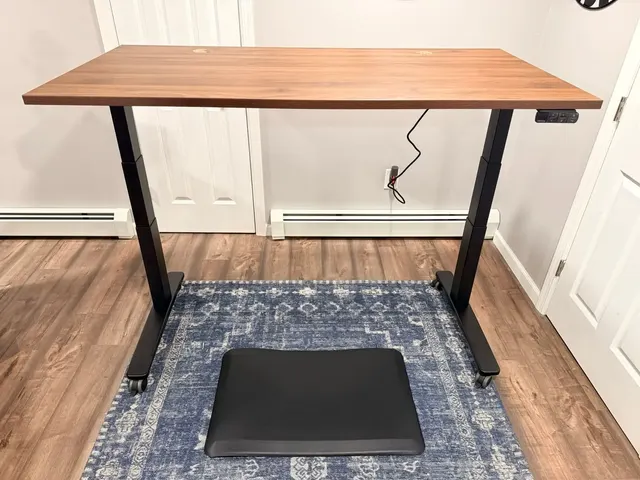
The UPLIFT V3 Standing Desk is the standing desk we recommend for a complete ergonomic workstation. Its 355 lb capacity, 15-year frame warranty, and upgraded V3 frame give it the strongest foundation in this setup. For the long-term writeup, see our full UPLIFT V3 Standing Desk review.

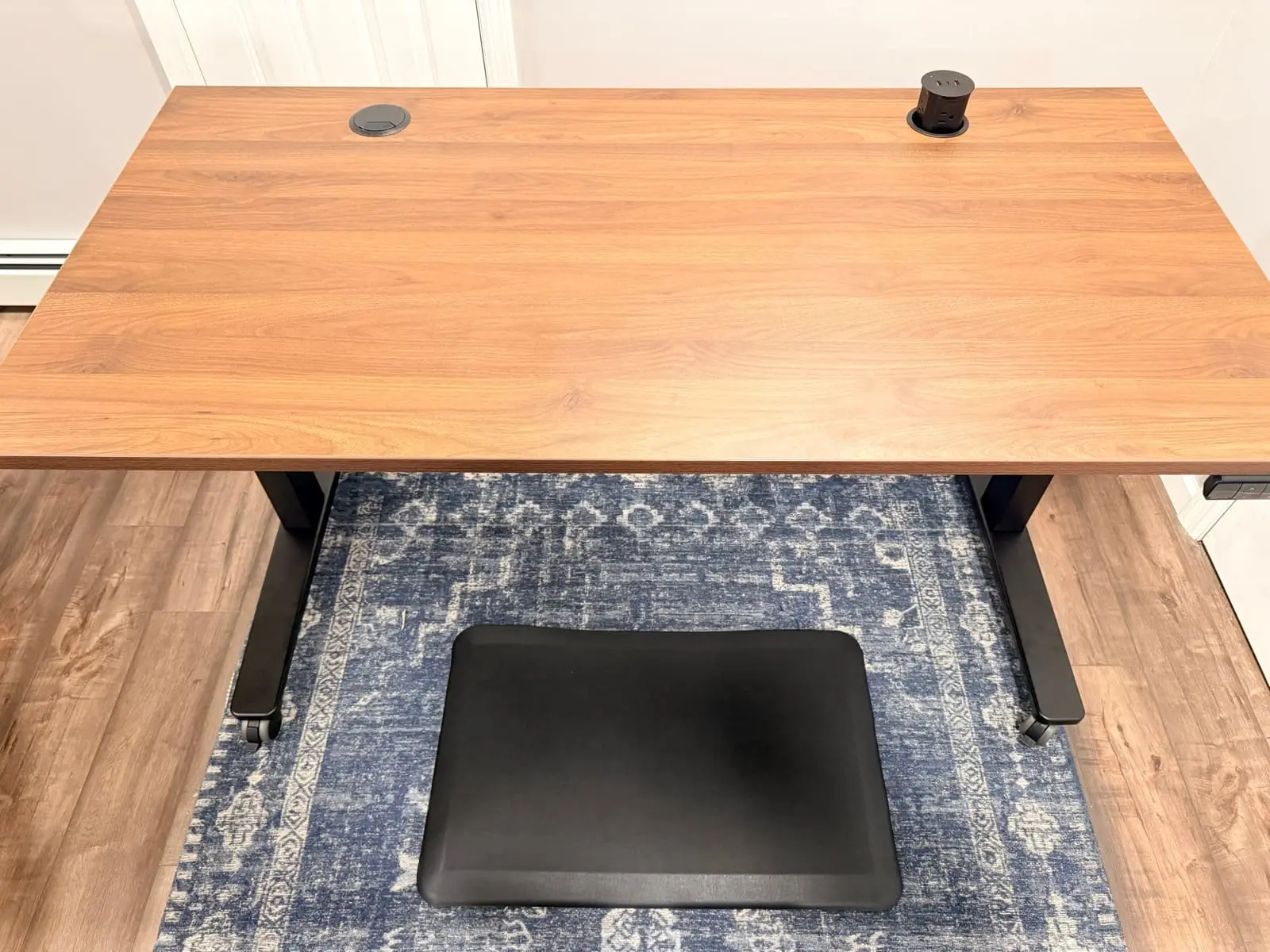
In Matt's documented walnut-laminate configuration, the steel frame stayed steady during normal typing at standing height. That observation applies to the configuration he used, not every desktop size, floor, caster, or maximum-height setup. UPLIFT lists dual-wall foot construction, a steel i-beam crossbar, steel motor-housing covers, and silicone pads on the leveling guides.
UPLIFT lists a 2-inch-per-second lift speed and operating noise below 48 dB. In Matt's setup, normal height changes were quick and quiet enough to make during a call. The six-axis anti-collision system is designed to reverse when it detects an obstruction, but it should not replace keeping people, pets, and equipment clear of the desk's travel path.
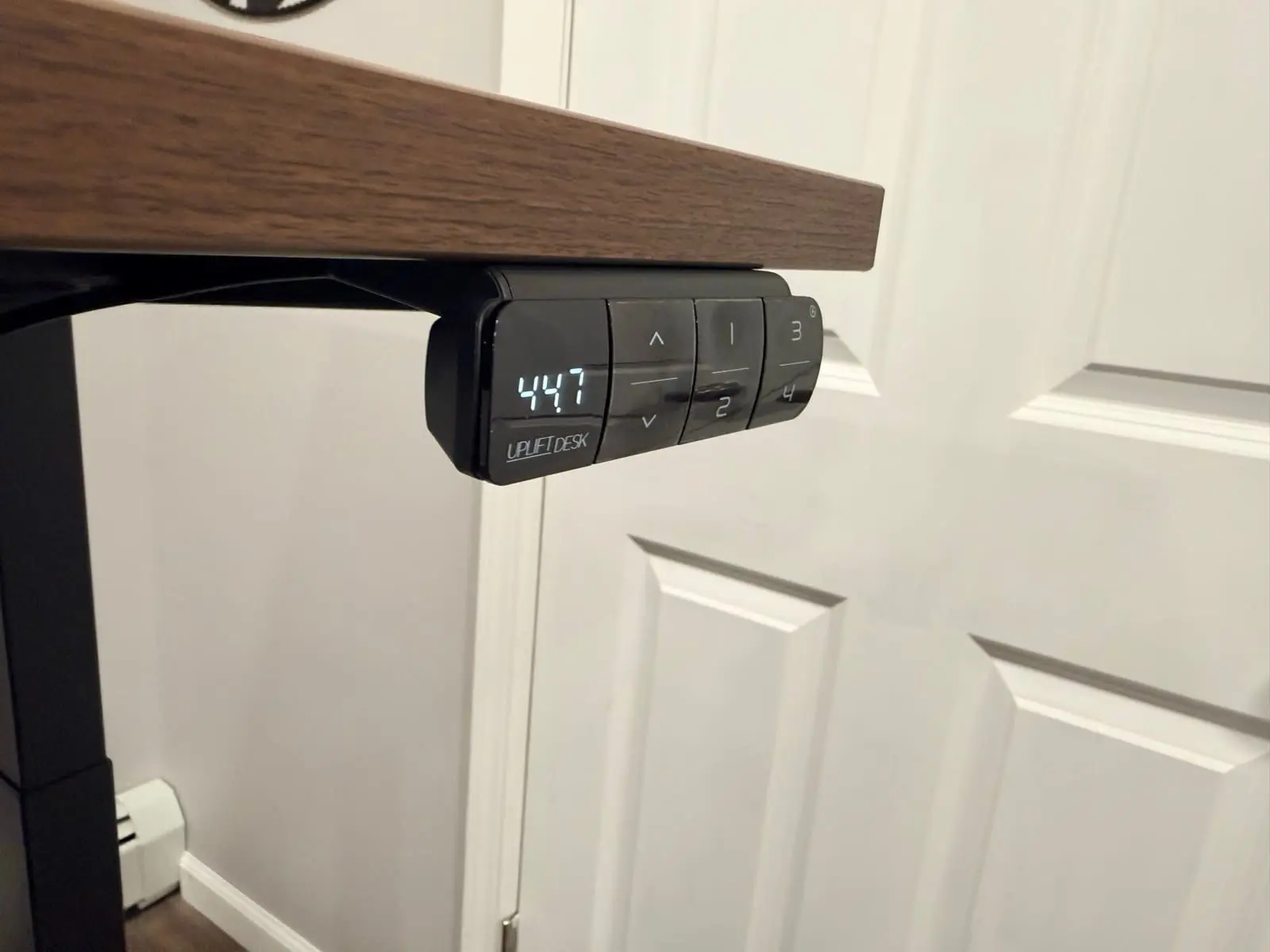
The advanced keypad stores four height presets and includes a USB charging port. One-button position changes make it easier to use the sit-stand function consistently. UPLIFT Desk says the V3 reduced the hardware count from 32 to 16 screws and uses pre-installed fasteners and a pre-installed control box. Matt's full review documents the real assembly experience.
UPLIFT lists a 355 lb lifting capacity, which leaves substantial published headroom for many multi-monitor workstations once the desktop and every mounted accessory are counted. The listed 22.6-to-48.7-inch height range covers a broad span, but you should measure your seated and standing elbow heights instead of relying on a population estimate. UPLIFT offers multiple desktop materials and sizes, and lists ANSI/BIFMA X5.5-2021 compliance for the V3.
The patent-pending FlexMount Cable Management system is included at no extra cost. The "ladder design" PET pouch holds up to 10 lbs of cables and adapters with tool-free depth adjustments. Oval slots in the i-beam provide multiple access points for routing cables front to back. And with 48 threaded mounting points on the steel frame, you can attach UPLIFT Desk accessories (monitor arms, keyboard trays, power strips, storage) directly without drilling.
The UPLIFT Desk 15-year frame warranty backs the investment. If you're also considering the current FlexiSpot E7 Pro, see our FlexiSpot E7 Pro vs UPLIFT V3 comparison. The V3 side includes Matt's hands-on experience, while the E7 Pro side is based on current manufacturer documentation and does not reuse an older Amazon model with a similar name.
Buying Tips
- Build your desk on the UPLIFT V3 desk builder to see real-time pricing as you add options. The walnut laminate desktop is one of the best-looking options and is Greenguard Gold certified
- Choose the C-frame legs if your desk sits against a wall. The 27.5" C-frame feet push weight forward and eliminate the rear foot that blocks cable runs
- The advanced keypad with USB is worth the upgrade over the basic keypad. Preset buttons make the difference between actually standing and leaving the desk at sitting height all day
- Add the pop-up power grommet if you use a laptop. It puts power and USB right on the desktop surface instead of reaching under the desk
Best Ergonomic Chair: Sihoo Doro C300 (or UPLIFT Clarksville)
Finding a good ergonomic chair under $500 used to mean accepting compromises. Two chairs have changed that equation, and we recommend either depending on your priorities.
The Sihoo Doro C300 ($300-400) uses a spring-loaded lumbar mechanism that follows your spine's natural movement rather than pushing against a fixed point. Static lumbar support only works when you're sitting in exactly one position. The moment you lean forward or shift to reach your keyboard, the support disengages. The C300's dynamic system maintains contact with your lower back through a wider range of positions. Full mesh construction keeps you cool, and the 3D armrests let you fine-tune arm position relative to the desk surface.
The UPLIFT Clarksville Ergonomic Chair ($359) is the warranty-matched pick. Its adaptive lumbar frame flexes with the backrest rather than using a spring-loaded pad. The 2:1 synchro-tilt mechanism lets you recline deeply while keeping your feet flat on the floor. The 3-inch high-density foam seat cushion retains its shape over long sessions. And the UPLIFT Desk 15-year warranty matches the V3 desk, giving you a complete workstation with consistent warranty coverage from one company.
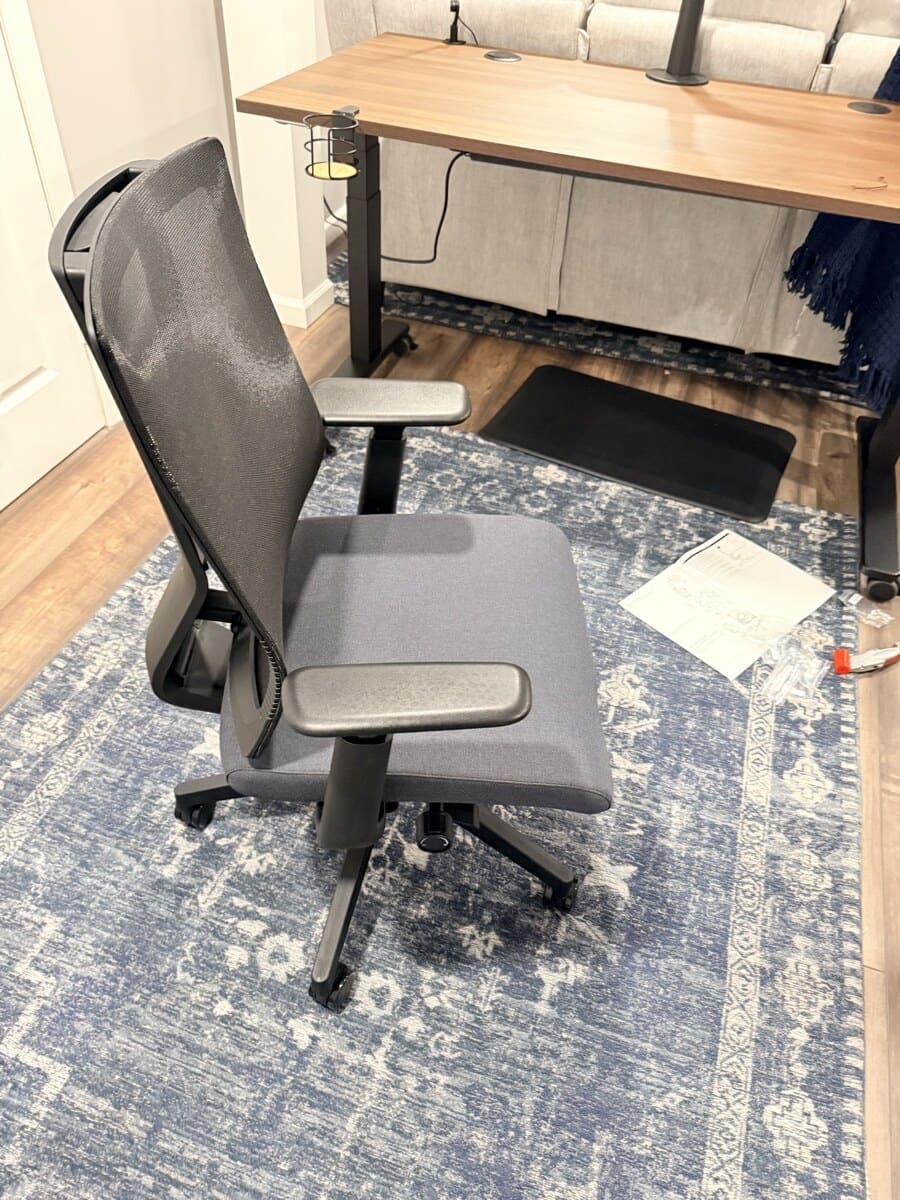
Choose the Sihoo Doro C300 if: you prefer full mesh (seat and back), want the spring-loaded dynamic lumbar, or want to spend less and shop on Amazon.
Choose the UPLIFT Clarksville if: you want the 15-year warranty to match your UPLIFT V3 desk, prefer a foam seat cushion over mesh, or want a single-company warranty experience through UPLIFT Desk.
For more chair options, see our Best Ergonomic Chairs Under $400 guide.
Buying Tips
- Sit in your chosen chair for at least 3 full workdays before judging comfort. Mesh tension and foam cushions both need 15-20 hours to break in
- Set the lumbar to its middle position first, then adjust by one click per week. Jumping straight to maximum pressure causes lower back fatigue in lighter users
- The armrests should align with the UPLIFT V3 desk surface so your forearms rest naturally. Angle them inward about 15 degrees for a natural forearm-to-keyboard alignment
- Buy from a retailer that honors the full warranty with free return shipping. UPLIFT Desk direct, Sihoo's official store, and Amazon all qualify
Best Monitor Arm: Ergotron LX (or Range-X by UPLIFT Desk)
The Ergotron LX ($150-200) has been a category leader for years. The Constant Force spring provides smooth, one-handed repositioning of monitors up to 25 pounds. Push your screen up, down, forward, back, or to either side with minimal effort and it stays exactly where you put it. All-metal construction, integrated cable routing, and a 10-year warranty.
The Range-X Single Monitor Arm by UPLIFT Desk ($139) is a strong alternative that pairs cleanly with the UPLIFT V3 Standing Desk. It supports monitors up to 17.6 lbs with 13.2 inches of height adjustment and 26.3 inches of forward reach. The standout is the UPLIFT Desk 15-year warranty, which exceeds the Ergotron's 10-year coverage. It also mounts directly into the UPLIFT V3's 48 threaded mounting points for a clean, integrated look.
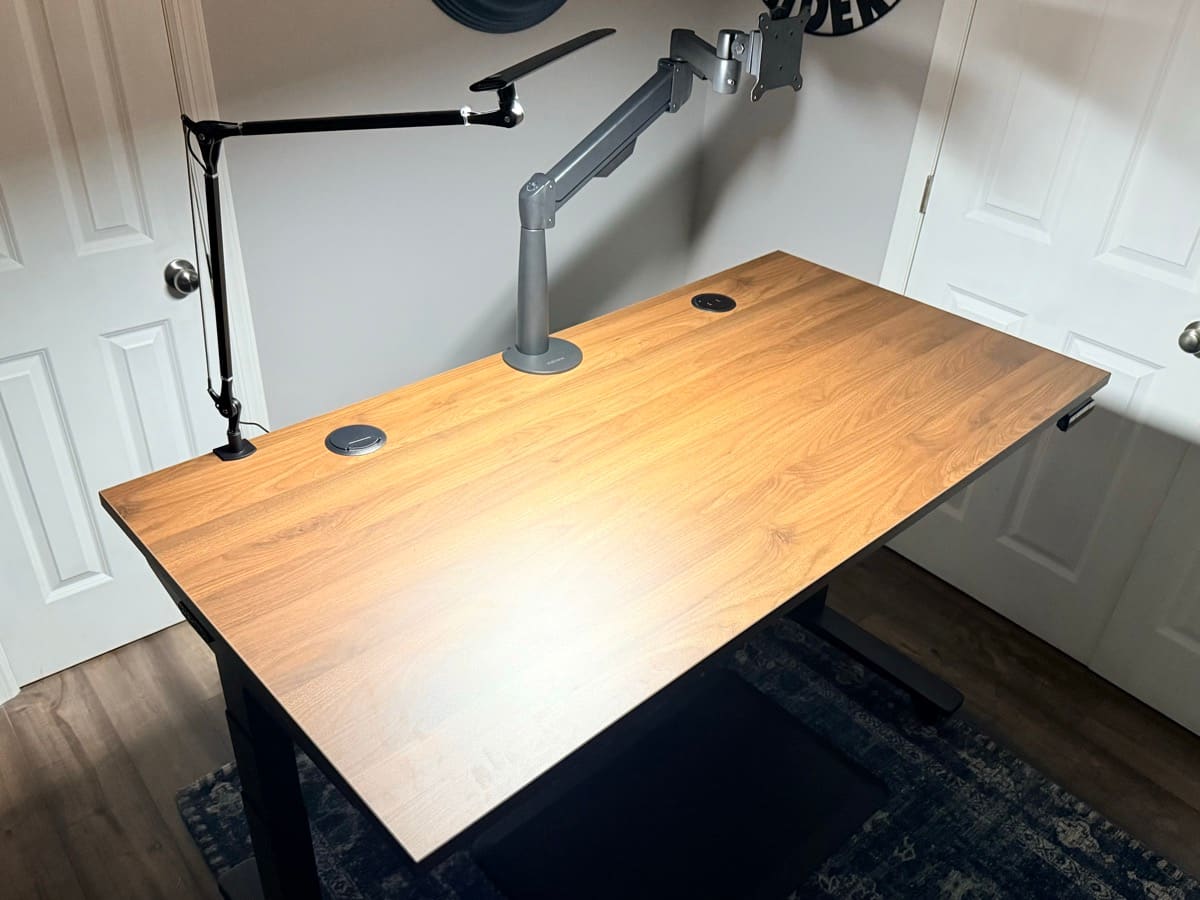
Choose the Ergotron LX if: you want the Constant Force spring (never loses tension), need to support monitors over 17.6 lbs, or prefer the smoothest possible repositioning.
Choose the Range-X if: you want the 15-year warranty to match your UPLIFT V3 desk, your monitor is under 17.6 lbs, or you want a clean mount into the V3's threaded points.
For more options including budget picks, see our Best Monitor Arms for Desk Space guide.
Buying Tips
- Weigh your monitor before ordering. The Ergotron LX supports 7-25 lbs, the Range-X supports 3.75-17.6 lbs
- Set the tension adjustment after mounting. Factory tension is calibrated for a 15 lb monitor
- Mount the arm 6-8 inches from the back edge of your desk to maximize the vertical range
- Route your monitor cable through the cable management before tightening the arm joints
How These Products Work Together
The real value of this combination isn't just good products. It's how they create an adaptable system that maintains proper ergonomics across multiple working positions.
When sitting, set the UPLIFT V3 Standing Desk to a height where your elbows form roughly 90-degree angles with the keyboard. The chair's adjustable armrests should align with the desk surface so your forearms rest naturally without shoulder hunching. The monitor arm positions your screen so the top sits at or slightly below eye level, about an arm's length away.
When you press the UPLIFT V3's memory button to transition to standing height, push the monitor arm upward to match your new eye level. The entire transition takes under 15 seconds. Your keyboard angle, arm position, and screen distance all maintain proper ergonomic alignment because each component adjusts independently.
This is the key advantage over fixed setups. When all three components adjust independently, you eliminate the compromises that cause discomfort over time.
Once the desk, chair, and screen position are set, lighting is the next system decision. The monitor light bar versus desk lamp comparison explains which option fits screen-focused work and which one is better for paper, broader task lighting, or video calls.
Current Price Check
| Component | Current Price |
|---|---|
| UPLIFT V3 Standing Desk | $599-$939 |
| Sihoo Doro C300 / UPLIFT Clarksville | $300-400 / $359 |
| Ergotron LX / Range-X | $150-200 / $139 |
Add the current prices for the exact combination you want, including desktop, color, caster, and monitor-arm options. For a lower target budget, see the Complete Home Office Setup Under $1,000 guide.
Step-by-Step Setup Guide
Step 1: Assemble and position the UPLIFT V3 Standing Desk. Start here since it's the heaviest component. Leave enough wall clearance for the desktop, cables, and monitor arm through the full height range. UPLIFT advertises a fast single-tool frame assembly, while Matt's hands-on review documents the complete real-world build. Use the leveling feet to steady the desk on your floor.
Step 2: Mount the monitor arm. Attach the clamp near the rear edge, centered on your seating position. If using the Range-X, mount into the UPLIFT V3's threaded points. Run the arm through its full range of motion before final tightening.
Step 3: Set desk memory presets. Sit in your chair to find your ideal sitting height (elbows at 90 degrees) and save as preset 1. Stand and save your standing height as preset 2. Save a third preset for perching height if you like.
Step 4: Assemble and calibrate the chair. With the desk at sitting height, adjust seat height so your feet rest flat and thighs are parallel to the ground. Set armrests to match the desk surface. Adjust seat depth so two to three fingers fit between the seat edge and the back of your knees.
Step 5: Position the monitor. While seated, place the top third of the screen at eye level, roughly an arm's length away. Tilt slightly backward (10-20 degrees) to reduce glare.
Step 6: Test the full range. Transition between sitting and standing presets. At each height, verify monitor, chair, and desk maintain comfortable positions. Adjust and resave presets as needed.
Common Ergonomic Setup Mistakes to Avoid
Setting the monitor too high. The top of your screen should be at or slightly below eye level, not above it. Looking upward strains your neck extensors and contributes to tension headaches. This is the single most common ergonomic error in home offices.
Ignoring the 90-degree elbow rule. Your elbows should form roughly 90-degree angles when your fingers rest on the keyboard. If you're reaching up or hunching your shoulders down, the desk height is wrong. This is exactly why a height-adjustable desk matters.
Locking out the chair recline. A fixed upright posture is not the only usable position. If your chair supports controlled recline, try a modest angle that keeps your feet supported and lets you change posture without reaching for the keyboard.
Never actually changing position. A standing desk only helps if you use its range. Start with short standing periods, change position before discomfort builds, and adjust the schedule to your body and workload. The V3's programmable presets reduce the friction of switching.
Positioning the monitor too close or too far. Start around an arm's length away, then adjust for screen size, text scale, vision, and whether you lean forward to read. The useful distance is the one that keeps text clear without pulling your head toward the screen.
Skipping breaks. No equipment replaces movement. Take brief movement breaks during long work blocks and change posture regularly instead of treating one chair or desk position as the answer for an entire day.
Frequently Asked Questions
Is a premium desk setup worth the cost?
It depends on your budget, work hours, and which constraints the equipment solves. Start with the component causing the clearest fit problem, compare live prices, and do not treat warranty length as proof that every product will last for the full coverage period.
Can I start with one product and add the others later?
Yes. If budget is tight, start with the chair since it has the single biggest impact on daily comfort. Add the UPLIFT V3 Standing Desk next, then the monitor arm. Each product provides standalone value even before the full system is assembled.
Do I need a standing desk mat with the UPLIFT V3?
An anti-fatigue mat can make standing more comfortable for some users. UPLIFT Desk also offers an Inclining Walking Pad if you want an active-work option. Neither is universally necessary, so add one only if it solves a comfort or movement need in your setup.
Will the Ergotron LX work with an ultrawide monitor?
The standard LX supports monitors up to 34 inches and 25 pounds, covering most ultrawides. For 38-inch or 49-inch super-ultrawides, you'll need the Ergotron HX (up to 42 pounds). Check your monitor's weight and VESA pattern before ordering.
How often should I switch between sitting and standing?
There is no single sit-stand interval that fits every person or task. Begin with short standing periods, switch before discomfort builds, and increase only if the position remains comfortable and productive.
What if I have limited space for a standing desk?
Check the smallest current V3 desktop and frame configuration against the exact room dimensions, door swing, chair clearance, and monitor-arm movement. A monitor arm can free surface area, but its rearward movement and clamp still need clearance.
Should I get the UPLIFT Clarksville or the Sihoo Doro C300?
Both are excellent. The UPLIFT Clarksville ($359) gives you a 15-year warranty that matches your UPLIFT V3 desk, an adaptive lumbar frame, and a foam cushion. The Sihoo Doro C300 ($300-400) gives you spring-loaded dynamic lumbar, full mesh construction, and is available on Amazon. We recommend the Clarksville for the warranty match, but the C300 is the better choice if you prefer mesh seats or want to spend less. See our full chair comparison for details.
Are there cheaper alternatives for the full setup?
Yes. See the Complete Home Office Setup Under $1,000 guide or the Complete Home Office Setup Under $500 guide. Check the live prices in those guides because a bundle can cross its target when product pricing changes.
Evidence disclosure: Matt has assembled and used the UPLIFT V3 and Clarksville configuration shown here. The Sihoo, Ergotron, and other non-UPLIFT recommendations are research-backed analysis based on manufacturer documentation and verified product specifications, not WorkstationSetup hands-on tests. UPLIFT Desk provided some products for review.
Related Guides
- UPLIFT V3 Standing Desk Unboxing: Assembly walkthrough and real photos
- FlexiSpot E7 Pro vs UPLIFT V3: Head-to-head desk comparison
- Which UPLIFT Standing Desk Is Right for You?: Full UPLIFT lineup
- Best Standing Desks Under $700: Full desk roundup
- Best Ergonomic Chairs Under $400: Full chair comparison
- Best Monitor Arms for Desk Space: Full arm roundup
- Best Desk Lamps for Home Office: Complete your lighting
- Best Desk Mats for Home Office: Protect your desktop
- Desk Cable Management: Complete Setup Guide: Maximize FlexMount
- Complete Home Office Setup Under $1,000: Budget + UPLIFT premium builds